



Executive Summary:
- Canva AI Unification: In late 2025, Canva evolved from a design tool into a full “Creative Operating System”, unifying design, marketing, data, and collaboration into a single AI-native platform. With 260 million monthly active users, $3.5 billion in revenue, and a $65 billion valuation, Canva is now the dominant force in visual communication.
- Visual Suite 2.0: The platform now merges documents, presentations, videos, spreadsheets, and websites into a single collaborative environment, streamlining workflows for teams and enterprises.
- Cross-Platform AI Ecosystem: Tight integration with tools like ChatGPT, Microsoft Copilot, and partner apps improves AI discoverability and strengthens AI citation across LLM-based search engines, supporting modern AISO strategies.
- Industry Reach: From education to healthcare, finance, retail, and government, AI-driven content creation accelerates productivity, enhances engagement, and enables tailored communication at scale.
- Future of Creativity: Canva’s AI evolution exemplifies a human-led, AI-assisted creative future where accessibility, collaboration, and rapid iteration become standard, empowering users without deep technical skills.
A handful of years ago, most folks could only gawk at slick campaign visuals, magazine spreads, and compelling online videos, assuming they were the domain of design savants or resource-rich corporations. Today, that notion feels almost quaint. What’s changed? intuitive visual editing, templates, cloud collaboration, and generative AI, now also optimized for LLM-based search engines and AISO, so work is easier to find in answer-first environments.
Design for All
The longstanding gap between “designer” and “user” kept creativity on a tight leash. Most people, whether in marketing, education, or nonprofit work, simply didn’t have the time or expertise to fuss with Illustrator programs or wrestle with custom fonts. Enter what feels like the great leveling: browser-based apps, massive template libraries, and, crucially, AI that handles both creative grunt work and ideation.
Now, whether you’re a classroom teacher prepping a lesson plan, a side-hustle entrepreneur building social posts, or a sales pro rewriting the week’s pitch deck, producing beautiful, on-brand assets isn’t a weekend-destroying chore. Tools that used to sit behind paywalls or complex workflows have become everyday utilities.
Take, for instance, a social impact group trying to rally volunteers. In the past, they’d be stuck with generic fliers or expensive agency proposals. These days? High-impact posters, videos, and interactive web content can be drafted in minutes, AI-powered from concept all the way to translation and accessibility.
Evolution of AI in Canva (2019-2026)
| Year/Period | Milestone & Feature Description | AI Feature Category | Key Details |
| 2019-2020 | Early AI-driven design suggestions implemented | Foundational AI & Templates | Introduction of drag-and-drop, automated template recommendations, and basic ML for design layouts |
| 2021 | Photo Background Remover & Acquisition of Kaleido AI | Computer Vision | Seamless AI-powered image background removal, opening the door for more visual AI editing tools |
| 2022 | Magic Write™ introduced | Generative Text | First AI-powered copywriting tool using large language models for social posts, descriptions, more |
| 2023 (Q1-Q2) | Magic Design, Magic Edit, Magic Eraser, and expanded Magic Write | Generative Design & Image Editing | Image manipulation by prompt, content-aware tools, and template suggestions by mood/purpose |
| 2023 (Q3) | Brand Hub & Extended Multilingual Support | Workflow & Productivity AI | Advanced brand assets management plus 18+ language support for Magic Write |
| 2023 (Q4) | Video enhancements: Beat Sync, AI Translate | Generative Video & Localization | AI-matched audio/video sync and instant translation in 100+ languages |
| 2024 | Canva Code (no-code interactive widgets), deeper partner integrations | No-Code AI, Ecosystem | Enables custom calculators, games, and live business tools in designs without technical coding |
| 2024 (H2) | AI-powered Canva Sheets, Magic Insights | Data Analysis & Visualization | Automated spreadsheets with natural language queries (“Magic Formulas”) for charting/insights |
| 2025 (Q1-Q2) | Unified Canva AI launch: Conversational interface for all creation flows | Universal Generative AI | Centralized “Canva AI” assistant for texts, images, generative design, coding, accessible via text, voice, or image upload |
| 2025 (Q2) | Major photo/video editor “AI glow-up” and Magic Animate/Morph | Creative Enhancements | New background generation, high-res upscaling, instant animation/morphing of static objects |
| 2025 (Q2-Q3) | Real-time Collaboration Upgrades | Collaboration AI | AI-powered version tracking, edit suggestions, team analytics, and live cross-device edits |
| 2025 (Q3) | Voiceover recording, AI code downloads, bulk creation enhancements | Creative AI & Export | Export interactive designs as standalone code; enhanced bulk creation workflows; brand template improvements |
| 2025 (Q4) | Creative Operating System launch, Canva Design Model, Canva Grow, Video 2.0 | Platform AI & Marketing | World’s first design-aware AI model; end-to-end marketing platform; Google Veo 3 integration for text-to-video generation |
| 2025 (Q4) | Affinity by Canva made free forever; Canva Forms, Email Design, 3D object generation | Professional Design & New Product Categories | Professional-grade design tools (Designer, Photo, Publisher) unified and permanently free; expansion into forms, email marketing, and 3D content |
| 2025 (Q4) | Magic Media Style Reference | Brand AI | Upload reference images to keep all AI-generated visuals on-brand and stylistically consistent |
| 2026 (Q1) | Updated Contributor Agreement (AI content rules, Jan 14, 2026); Canva Create 2026 announced for April 16 at SoFi Stadium | Governance & Events | Clearer AI content rules for contributors; largest Canva event to date planned |
AI Integration Timeline
A quick glance at recent platform history tells its own story. A decade ago, templates were king. Then came seamless drag-and-drop, mobile-first collaboration, and an explosion of asset libraries. But the real swerve arrived when AI-powered capabilities started threading through the entire design stack.
By 2023, Magic Write™ had made surprisingly coherent first drafts achievable in a blink, and Magic Design™ was suggesting layouts that actually fit the content, rather than just filling in “lorem ipsum” and hoping for the best. 2024 brought generative image and video creation, instant AI-powered design resizing, and brand control tools.
The tipping point? Integrations.
AI Integrations and Ecosystem
Smart tools rarely live in isolation. The real magic of the modern creative stack is its porousness, smart integration with other workflows, and AI ecosystems.
AI in ChatGPT and Copilots
The partnership between the design platform and ChatGPT is already a case study in cross-silo AI cooperation. With a single click, users can brainstorm, generate on-brand templates, and share designs without juggling browser tabs or APIs. Marketers can have campaign reports summarized, extract product insights, or auto-draft entire launch plans, all grounded by their existing creative history. Microsoft Copilot, meanwhile, brings similar fluency to enterprise Office stacks, letting organizations auto-generate branded decks and business documents at speed.
Apps Marketplace (Partner Models)
A growing ecosystem of partner apps is extending AI capability into data visualization, e-commerce, and enterprise cloud tools. Whether it’s pulling live sales data or connecting to analytics dashboards, the creative environment is quietly becoming a “hub” for multi-source data and distribution.
Third‑Party Partnerships and Future Integrations
Expect greater collaboration with standalone generative platforms, social scheduling tools, and e-commerce plugins. The future screams cross-platform: creating once, adapting, and distributing everywhere, no copy-and-paste required.
AI-Powered Platform Strategy
Stepping back, the core strategy is to enable visual communication at the speed of thought. Not just templates for the sake of convenience, but proactive, personalized, and collaborative creative workflows. The logic is clear: if you can text a friend with a question or a meme, you should be able to sculpt a webinar banner, product catalog, or investor deck with the same agility.
The platform now provides an all-in-one Visual Suite, spanning documents, presentations, videos, spreadsheets, and even websites, melding all of this with conversational AI partners and real-time feedback loops. Behind the scenes, AI not only crafts visuals but interprets business objectives, offers on-brand suggestions, and transforms data into narratives. The era of “smart visual productivity” is already visible everywhere from middle school classrooms to the Fortune 100.
Key Core AI Features and Technologies
1. Canva AI:
The newly unified Canva AI consolidates all generative and assistive functions, design, text, imagery, and data into a single conversational interface. Rather than hopping between menus, users describe ideas or upload references and receive contextual, editable results tailored in seconds.
2. Magic Write™:
Magic Write™ has evolved. Building on OpenAI’s large models, it crafts copy, summarizes documents, drafts social posts, generates product descriptions, and even pulls key data insights directly into your workspace. Workflows are now driven by prompts rather than forms or menus, reducing friction across creative, business, and academic uses.
3. Magic Design:
Type in a vision, “summer festival poster with retro theme”, and Magic Design generates fully-editable layouts, matching images, and even style recommendations. It now draws on multimodal AI, enabling users to upload images, color palettes, or brand assets as creative references for tailored outputs.
4. Canva Code:
With Canva Code, you create interactive widgets (like calculators, quizzes, or pricing tools) simply by describing the end goal. The feature translates natural language into usable, embeddable web tools, no technical skills required. As of Q3 2025, interactive designs can also be exported as standalone downloadable code. This marks a major leap for educators, businesses, and marketers seeking dynamic content.
5. AI Photo & Video Editing:
Canva’s photo editor can now:
- Reimagine images with new backgrounds, lighting, or moods via AI prompts.
- Detect and edit key objects with a single click: recolor, move, replace, or erase elements intuitively.
- Enhance low-res or imperfect images with upscaling and restoration.
- Generate photorealistic or stylized images from text descriptions.
- Generate 3D objects from text prompts for use in designs and presentations.
Video tools have been significantly upgraded with Video 2.0 (Q4 2025), now featuring Google Veo 3 integration for generating 8-second video clips from text prompts, alongside AI voiceovers, music sync, and professional-grade editing tools. Magic Media Style Reference allows users to upload a reference image so that all AI-generated visuals maintain consistent on-brand styling.
6. Magic Animate & Magic Morph:
Static designs transform into captivating animations either by prompt or one-click effect application. Magic Animate choreographs transitions and motion based on design goals, while Magic Morph allows users to “morph” objects into entirely new visuals for brand storytelling or attention-grabbing graphics.
7. Canva Sheets:
Canva Sheets combines spreadsheet functionality with design-first interfaces. Leveraging AI, it auto-generates visualizations, suggests data insights, and supports “Magic Formulas”, natural language-driven calculations and pattern detection. Teams can turn raw data into publish-ready infographics and reports with unprecedented speed.
8. Magic Insights & Magic Formulas
Building on analytics, Magic Insights surfaces data trends directly within design workflows, while Magic Formulas lets users ask questions in everyday language, instantly generating charts, graphs, and storytelling visuals from raw data. This disrupts the traditional boundaries between designers, analysts, and business leaders.
Detailed Industry Applications & Use Cases
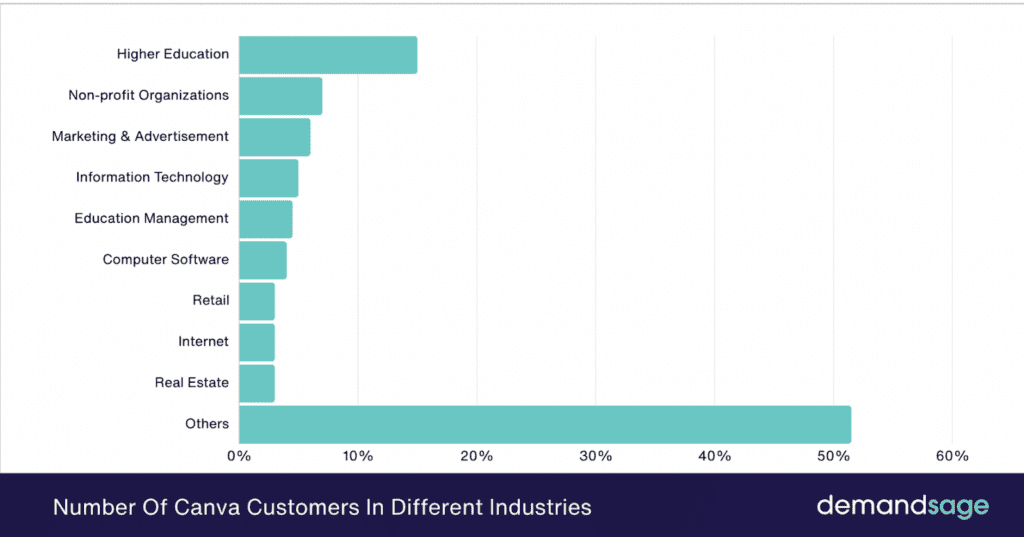
Marketing, Advertising & Branding (B2B, B2C, D2C)
In Marketing and Sales, speed and consistency are everything. With Canva AI and Magic Studio, marketers rapidly generate campaign creatives such as ads, landing pages, influencer kits, and localized social content, simply by prompting the assistant with a brief or reference image. Image variations, A/B copies, and platform-specific assets are personalized and distributed globally in one workflow. The shift to “prompt-to-publish” is enabling brands to react to market or seasonal trends almost instantaneously, enhancing relevance and ROI. Even D2C startups now create on-brand assets, run bulk product catalogues, and launch cross-channel campaigns without ever leaving the platform.
With the launch of Canva Grow in Q4 2025, this workflow now extends into performance marketing. Grow learns your brand from your website, generates AI-powered ad variants, publishes directly to Meta, and provides real-time analytics with AI optimization recommendations, all within Canva. Integrations with Google Analytics, Salesforce, and HubSpot pull in campaign data for a true design-to-ROI loop.
Sales, Business, and Enterprise (B2B)
For B2B organizations, the integration of Canva Sheets with Magic Insights has introduced a new paradigm in sales enablement, turning raw sales numbers, projections, and case study data into high-impact, on-brand charts, infographics, and pitch decks. Team collaboration is streamlined: multiple contributors can revise presentations or product guides simultaneously. AI QC ensures every asset meets brand standards. Even highly regulated sectors, like finance and legal, accelerate client communications and reporting while automating compliance visuals, proposals, and whitepapers.
Education & E-Learning (B2B, B2C)
Educators at all levels now design interactive lesson plans, assessments, and e-learning resources as easily as editing a document, with Canva Code letting non-coders add quiz apps, feedback forms, or flashcards to digital handouts. Magic Write and Magic Insights summarize dense research for student presentations, and automated localization broadens access to materials for global learners. Universities deploy branded templates campus-wide, ensuring consistent outreach and institutional branding across research posters, course catalogs, and alumni newsletters. With 100 million education users worldwide, Canva for Education remains one of the platform’s most impactful verticals.
Healthcare & Pharma (B2B, B2C)
Healthcare organizations and pharmaceutical brands leverage AI tools for fast, clear communication, producing patient guides, compliance posters, and wellness content adapted to different languages and literacy levels. Canva AI’s ability to instantly visualize statistics and research makes complex information more digestible for stakeholders, practitioners, and patients alike. Nonprofits and NGOs in public health create persuasive awareness materials and internal training content, often at global scale.
Retail & E-commerce (B2C, D2C, B2B)
Retail and D2C brands rely on Canva AI to roll out new product launches, update storefront signage, and localize promotional materials across regions. Magic Studio at Scale enables instant “bulk creation”: thousands of product labels, detailed catalogs, or personalized promo banners are generated and customized with just a few clicks. Analytics dashboards are transformed into investor-ready visuals, keeping branding perfect and reporting seamless.
Finance, Banking & Consulting (B2B, B2C)
Banks and financial service providers produce data-intensive collateral, client updates, regulatory summaries, and trend reports by feeding spreadsheets into Canva Sheets and generating custom branded outputs using Magic Formulas. Consultants convert workflow diagrams, compliance checklists, and due diligence findings into engaging, boardroom-ready content. Client-facing teams scale up content production without ever compromising security or confidentiality.
Technology & Software (B2B, B2C)
Tech startups to established SaaS brands use Canva Code to visually prototype user interfaces, build interactive demos for trade shows, and rapidly update investor presentations. Product teams auto-generate onboarding guides, API documentation visuals, and support resources. With AI-driven localization, launches are globally synchronized, and Visual Suite integrations support cross-team project workflows across engineering, sales, and marketing.
Media, Entertainment, and Creative Agencies (B2C, B2B)
Media organizations build rich promotional assets, album covers, episode promos, podcast art, and digital ads by prompting AI with a theme or script. Agencies shortcut ideation with Magic Write and morph static case studies into animated, data-driven client pitch decks. Video producers reimagine scenes, create voiceovers, or localize show trailers in minutes using AI features within the upgraded Photo and Video Editors. With Affinity by Canva now free, agencies and freelancers have access to professional-grade vector design, photo editing, and desktop publishing tools alongside Canva’s collaborative features.
Food, Beverage & Restaurants (B2C, D2C)
Menus, table tents, and event flyers are generated in bulk, instantly localized, and customized for thematic promotions or seasonal updates. Social media teams create eye-catching recipe cards, influencer collaterals, and campaign visuals without endless approvals or slow desktop software.
Automotive, Manufacturing & Logistics (B2B, B2C)
Dealerships and OEMs automate brochures, infographics, and spec sheets from raw data inputs using Magic Insights. Logistics brands create compliance signage, training handouts, and event banners with pre-approved, on-brand elements. Real-time team collaboration ensures that dynamic project portfolios for clients and partners are always up-to-date.
Energy, Utilities & Environment (B2B, B2C, NGOs)
Energy companies and environmental nonprofits visualize ESG data, sustainability reports, and impact campaigns, effortlessly transforming technical research into public-facing materials. Magic Studio handles live localization for multinational projects, while Canva Code supports interactive calculators for carbon footprint or consumption analysis.
Government & Public Sector (B2B, B2C, B2G)
Public sector agencies automate everything from event pr materials to census infographics. Compliance-checked templates ensure uniformity in public information, while Magic Studio simplifies localization and accessibility adaptations for civic outreach campaigns and educational programs.
Community, Nonprofit, and Events (NGOs, NPOs, B2C)
Small nonprofits and grassroots community organizations now operate like ad agencies, instantly creating branded outreach kits, training handouts, grant proposal decks, event programs, and volunteer onboarding guides. Campaigns are scaled, analyzed, and improved using the same data-driven creative tools available to Fortune 500s.
Case Studies:
Marketing, Branding, and Retail
Fleet Feet:
Use Case:
- Fleet Feet and Movement Gyms both adopted Canva Enterprise to decentralize content creation.
- Fleet Feet store managers could instantly produce campaign assets via customizable templates, while Movement Gym location heads designed site-specific promotional materials independently.
Pain Point Solved:
- Previously, both chains struggled with slow turnaround on localized campaigns, excessive requests to overstretched central design teams, and bottlenecks caused by resource constraints.
- With Canva’s AI-powered templates and features like QR codes, Magic Resize, and Magic Switch, stores can meet local marketing needs within minutes instead of hours, freeing the corporate creative team and allowing for rapid campaign launches.
- For Fleet Feet, adopting Canva translated to cutting video design time from three hours to just 15 minutes, saving over 120 hours annually for the corporate team.
- The use of QR codes and rapid resizing allowed stores to respond quickly to local promotions and loyalty initiatives, boosting customer engagement and slashing external design costs.
- Movement Gyms saw a 30% increase in content output and a 42% reduction in design requests thanks to AI-powered automation, freeing staff for growth-focused activities and leading to more agile campaigns
Education
Wirreanda Public School:
Use Case:
- Wirreanda Public School in New South Wales fully integrated Canva for Education to infuse visual communication and digital skills into every classroom.
- Teachers designed interactive lessons using thousands of templates, while students created infographics and multimedia presentations for assignments.
Pain Point Solved:
- Teachers traditionally lost hours building engaging resources or struggled to make content visually accessible for all learners. Students often presented data or concepts in less engaging, text-heavy formats.
- Canva’s library of templates, real-time collaboration tools, and easy project sharing enabled teachers to reclaim planning time and students to express ideas visually, enhancing information retention and family involvement.
- By shifting from passive assignments to active, confidence-building visual storytelling, Wirreanda empowered students for a digital economy and ensured adaptability to future learning tools.
- Teachers cut material creation time and reported higher engagement, while students learned to collaborate and present multimodal content, skills now essential for modern education
Business, SaaS, and Finance
Docusign:
Use Case:
- DocuSign’s marketing and training teams deployed Canva to manage global rebranding, regionally customized sales material, and event presentations.
- Each international team worked with pre-set brand kits and templates, keeping all output visually unified and legally compliant.
Pain Point Solved:
- Prior to Canva, DocuSign faced high costs and slow turnarounds for design requests, inconsistency in branding across regions, and challenges maintaining legal and brand compliance in rapidly changing markets.
- Canva’s platform gave every regional team autonomy to quickly produce approved materials with collaboration and compliance tools built in, drastically cutting response time and oversight needs
Technology and Data:
Fivetran:
Use Case:
- Canva internally leveraged integration with Fivetran to aggregate and analyze customer behavior data from its own platform and third-party services like Google and Facebook.
- Insights powered more tactical marketing, tailored user experiences, and cross-platform campaign optimization, all within a single ecosystem.
Pain Point Solved:
- Previously, unifying customer data required heavy engineering support and expensive, fragmented analytics tools.
- With automated data pipelines via Fivetran, Canva’s business teams accessed highly detailed, actionable insights at a fraction of the cost and with greater workflow cohesion, reportedly saving over $200,000/year in engineering spend and accelerating customer engagement feedback loops
Canva’s transformation from a design platform to a unified AI creative suite in 2025 has made world-class content generation, data visualization, and interactive design accessible to all. Users describe, iterate, and publish at speeds once unfathomable just a few years ago, and the line between designer and user is rapidly blurring. The future now asks not whether AI can assist creativity, but how we as a global community will use that power to communicate more clearly, responsibly, and imaginatively.
Looking for information on more AI tools? Check out our blog category “AI Tools” here
Frequently Asked Questions:
1. What is Canva AI, and how is it different from traditional design tools?
Canva AI is a unified, generative design experience introduced in 2025. It integrates artificial intelligence into every design phase, including writing, layout, media generation, animation, and interactivity, all within a single conversational interface. Unlike traditional tools like Adobe Photoshop or Illustrator, which rely heavily on manual design skills and software expertise, Canva AI simplifies creation through natural language prompts, auto-layout suggestions, and brand-safe templates, without compromising visual quality. It also outputs well-structured, brand-safe assets designed for AISO, improving AI discoverability and the chance of AI citation in LLM-based search engines.
2. How does Canva AI support businesses with no in-house design teams?
Canva’s AI-powered templates, branding kits, and content assistants allow businesses to produce high-quality visual content, social posts, sales decks, product catalogs, and more, without needing full-time designers. Tools like Magic Write, Brand Kits, and Magic Resize help small businesses maintain professionalism and consistency across touchpoints. According to published case studies like those from Fleet Feet and Movement Gyms, even local store managers can now generate compliant, on-brand campaigns in minutes.
3. What industries benefit the most from Canva’s AI platform?
Every industry leveraging visual communication, education, healthcare, retail, finance, technology, nonprofits, media, and government can benefit from Canva AI. Its ability to transform data into dynamic visuals, localize content, and automate personalization unlocks efficiency and scale across B2B, B2C, and D2C sectors. Canva’s real-world case studies span sectors from schools in Australia to e-signature giants like DocuSign.
4. Can I use Canva AI for video and animation?
Yes. In 2025, Canva’s Magic Video and Magic Animate features allow users to transform static graphics and scripts into dynamic short-form videos. AI voiceovers, beat-synced music, transitions, and morphing animations add professional polish to content. This supports campaigns, explainers, digital signage, and even social reels, all with minimal human editing.
5. Is Canva safe to use for enterprises with strict brand guidelines or compliance needs?
Absolutely. Canva Enterprise offers Brand Hub and AI Brand Control, ensuring all assets comply with organizational identity. Designers (or non-designers) cannot use unapproved fonts, colors, or images. There are also permission and workflow systems in place for content review, making it GDPR-compliant and suitable for regulated industries like finance, healthcare, and education.